
OAuth 2.0 and OIDC
A guide on implementing an OAuth 2.0 authorization with OIDC
The OAuth 2.0 and OIDC authentication and authorization protocol supports a wide range of applications and services, providing a flexible and secure method for managing user authentication and authorization.
Overview
The OAuth 2.0 and OpenID Connect (OIDC) integration within the CLEAR platform offers a streamlined approach to secure identity verification. By leveraging the inherent security features and straightforward nature of OAuth 2.0, this integration ensures that users can confidently navigate the identity verification process.
This document outlines the essential steps to complete a secure identity verification flow using OAuth 2.0 with OIDC, guiding you through the process of obtaining and utilizing identity tokens effectively.
For more information on whether an OAuth 2.0 and OIDC integration pattern is right for your business case please refer to this guide: https://developer.okta.com/docs/concepts/oauth-openid/
Implementation
Setting up a Client
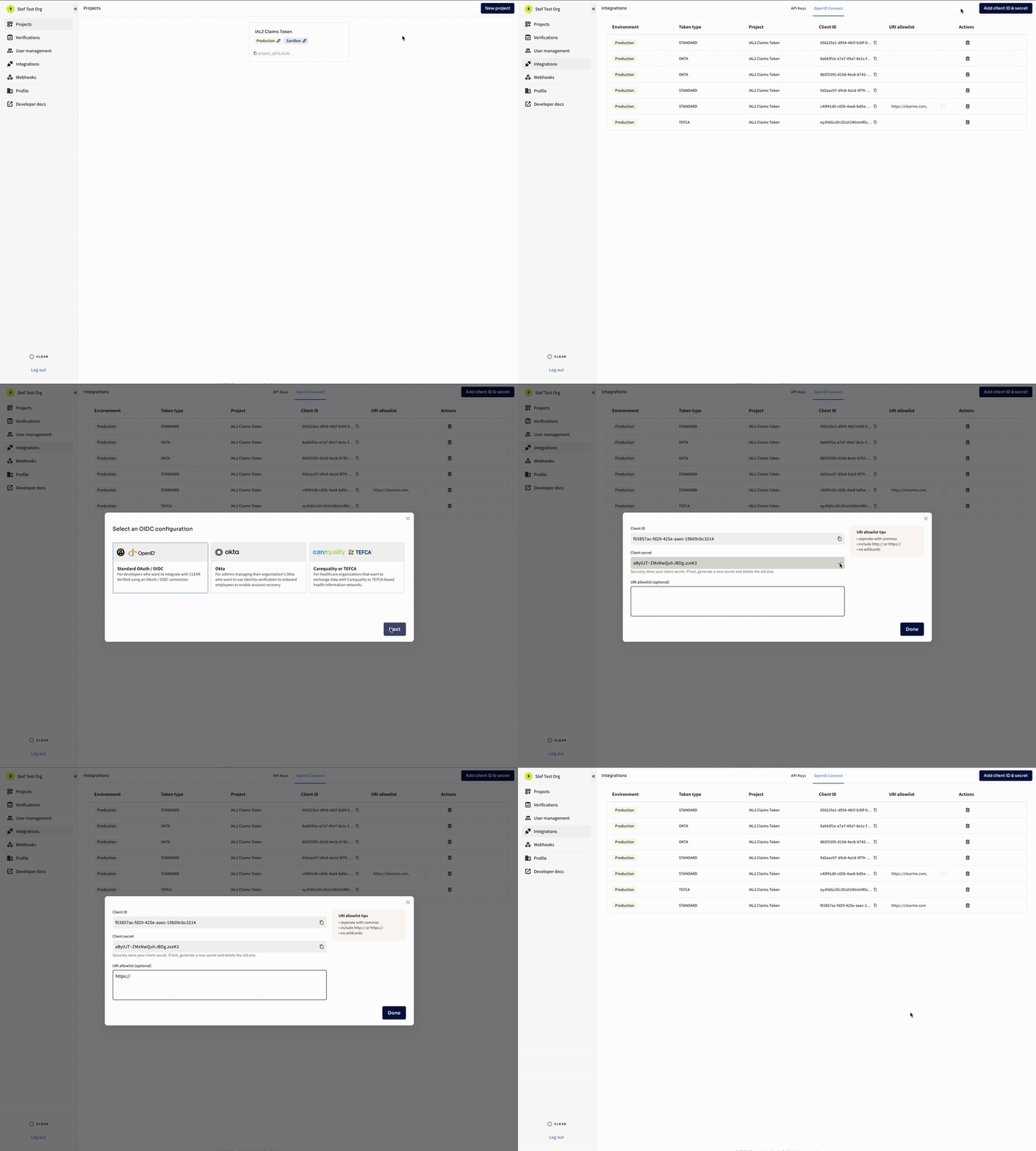
To set up your client, first navigate to the CLEAR1 Admin Console.
- Access the ‘Integrations’ page from the left sidebar.
- Go to the ‘OpenID Connect’ tab on the top-center of the Integrations page.
- Click the ‘Add Client ID & Secret’ button on the top right.
- For a standard OAuth / OIDC integration, click ‘Standard OAuth/OIDC’
- Select the project and environment that you would like to apply your integration to
- Access your Client ID and Client Secret. Please keep your secret in a secure place as it is only visible at the point of creation.
- Enter the URIs to be added to your URI allowlist.
- Once you’re done creating your Client - Secret pair, you will see the Client in your OpenID Connect list.
Note: CLEAR supports other types of OAuth/OIDC based integrations and tokens for our Okta Integration and Carequality and TEFCA Integrations. For instructions on integrating these two, please see our Okta Integration and IAS Integration Page
Authorization URL
To initiate the OAuth flow, direct the user to the following URL, which includes the client ID, redirect URI, scope, and a state parameter:
https://verified.clearme.com/integrations/oauth2/auth?response_type=code&client_id={{client_id}}&state={{state}}&redirect_uri={{redirect_uri}}&scope=offline%20openid%20offline_access&code_challenge={{code_challenge}}&code_challenge_method=S256Upon completion of the verification flow, the user will be redirected with an authorization code. This code must be extracted from the URL and used to perform the token exchange.
Token Request
| Key | Example Value |
|---|---|
client_id | abcdefgh-123a-1b2b-adde-09cd8765e9a3 |
client_secret | xxxxxxxuuuuuuuYYYYYYY |
scope | openid offline_access |
redirect_uri | https://www.your-redirect.com |
grant_type | ["authorization_code"] |
code_verifier | xxxxxxxuuuuzzzYYYYYYY |
code_verifier is optional . For more information refer to PKCE support detailed below.
Content-Lengthis a required Header. Do not set to0or leave empty.
Content-Lengthshould not be set manually, your HTTP client should calculate it. Standard clients (curl, Pythonrequests, Nodefetch/axios, JavaHttpClient, .NETHttpClient, Postman) do this automatically and acurately.If you are using a lower-level HTTP library that requires you to set headers yourself, set
Content-Lengthto the exact byte length of the URL-encoded request body.
curl --location 'https://verified.clearme.com/integrations/oauth2/token' \
--header 'Content-Type: application/x-www-form-urlencoded' \
--header 'Cookie: ' \
--data-urlencode 'client_id={{client_id}}' \
--data-urlencode 'client_secret={{client_secret}}' \
--data-urlencode 'scope=offline openid offline_access' \
--data-urlencode 'grant_type=authorization_code' \
--data-urlencode 'redirect_uri={{redirect_uri}}' \
--data-urlencode 'code={{code}}' \
--data-urlencode 'code_verifier={{code_verifier}}'
The response from this exchange will include both an access token and an identity token as base64-encoded JSON Web Tokens (JWT). The identity token should be decoded to parse the member attribute claims. Below is an example of decoded access and identity tokens.
Sample decoded access token
{
  "aud": [],
  "client_id": "57e32725-3d13-4856-8f60-c3e15ace5ece",
  "com": {
    "clearme": {
      "partner_scoped_user_id": "MuI6y9LrsROKX1NOWy2wXtZeV03YguxBPaixhECRCO"
    }
  },
  "exp": 1770234595,
  "iat": 1770230994,
  "iss": "https://verified.clearme.com/integrations",
  "jti": "7ec5f606-7c58-4fdc-8f0b-ee0f0e0fcfa8",
  "scp": [
    "offline",
    "openid",
    "offline_access"
  ],
  "sub": "MuI6y9LrsROKX1NOWy2wXtZeV03YguxBPaixhECRCO",
  "verification_completed_at": "2026-02-04T18:49:28",
  "verification_id": "verify_vZqN5rmDTn5R0LETdYHyvwkTQb0zjL8l",
  "verification_is_sandbox": true,
  "verification_status": "success"
}
Sample decoded identity token
{
  "address": "1325 Main St, Madison, WI 57303 US",
  "amr": [
    "selfie",
    "sms"
  ],
  "at_hash": "q_Kkv5-o2tLhf_n2llOiCw",
  "aud": [
    "57e32725-3d13-4856-8f60-c3e15ace5ece"
  ],
  "auth_time": 1770230972,
  "birthdate": "1987-01-15",
  "email": "[email protected]",
  "email_verified": true,
  "exp": 1770234594,
  "family_name": "HACKETT",
  "gender": "F",
  "given_name": "ALLISON",
  "iat": 1770230994,
  "iss": "https://verified.clearme.com/integrations",
  "jti": "2bcd399e-38f5-4751-9be7-2a4b4e1882b0",
  "phone_number": "+16085551243",
  "phone_number_verified": true,
  "preferred_username": "[email protected]",
  "rat": 1770230928,
  "sid": "482c63f2-e7b1-46e8-a4a7-a519585ab6d9",
  "sub": "MuI6y9LrsROKX1NOWy2wXtZeV03YguxBPaixhECRCO",
  "verification_id": "verify_vZqN5rmDTn5R0LETdYHyvwkTQb0zjL8l"
}
Validating the Tokens
To validate this token, call the following endpoint:
HTTP GET
https://verified.clearme.com/integrations/.well-known/jwks.json
This endpoint returns the public key associated with the private key used to sign the token. You can use an open-source JWT library to verify the token with the exposed public key.
Verification Result
Successful verification: A successful verification will return an access_token and an identity_token in the response. CLEAR will only ever return an identity_token if the demographics within the identity_token have been validated. The access_token can then be used to make a request to the Get Verification Session endpoint to understand the details of the successful verification session
Unsuccessful verification: An unsuccessful verification will return an access_token only, as the user demographics could not be verified. The access_token can then be used to make a request to the Get Verification Session endpoint to understand the details of the failed verification session.
Cancelled verification: A cancelled verification will return an access_token only, as the user demographics were not collected to completion and/or validated. In the event an access_token is returned the only path a user could have taken to cancel the verification session would have been to decline consent.
Abandoned verification: An abandoned verification will not return any token, as the user has abandoned the workflow so no redirect can take place for the auth code to be passed.
Example of canceled verification access token
{
  "aud": [],
  "client_id": "57e32725-3d13-4856-8f60-c3e15ace5ece",
  "com": {
    "clearme": {
      "partner_scoped_user_id": null
    }
  },
  "exp": 1765494295,
  "iat": 1765490695,
  "iss": "https://verified.clearme.com/integrations",
  "jti": "f36c9dff-63cb-432d-bf8a-5abe1c2b7b02",
  "scp": [
    "offline",
    "offline_access"
  ],
  "sub": "unknown",
  "verification_completed_at": null,
  "verification_id": "verify_uHYO9fF38uoVHorEEF50d44WUBxAs0Zq",
  "verification_is_sandbox": true,
  "verification_status": "canceled"
}
Authorization with PKCE
PKCE (Proof Key for Code Exchange) is an added security measure build on top of the existing authorization code flow. Incorporating PKCE adds a client-generated secret called the code_verifier, which is later used by the authorization server to validate the token exchange.
A derived value, known as the code_challenge, is sent in the authorization request, and the original code_verifier is later used by the authorization server to validate the token exchange.
To add PKCE, append:
Authorization URL
code_challenge={{code_challenge}}code_challenge_method= S256
Token Request
code_verifier={{code_verifier}}
SHA-256 is the recommended algorithm for code challenge generation. For best practices refer to RFC-7636 Section-4.1
Using the Get Verification Session API
Once the token exchange has completed the access_token and the verification_id (a claim within the access_token) can be utilized to pull the session details.
Whether the verification was successful or unsuccessful any session can be retrieved to gain more information about the user and session to aid identity proofing decisioning and user support.
curl https://verified.clearme.com/v1/verification_sessions/{{verification_id}}?reveal_sensitive_data=true \
  -H 'Authorization: Bearer {{access_token}}'
Example Response
{
    "id": "verify_5oooo22ddXXEL3YvvsXS1111dFccc3vv",
    "object_name": "verification_session",
    "activated_authentication_methods": [],
    "authenticated": true,
    "authentication_methods": [
        "sms"
    ],
    "check_metadata": [],
    "checks": [
        {
            "name": "Age on Gov ID is 18 or over",
            "value": true,
            "status": "completed"
        },
        {
            "name": "Gov ID back is not suspicious",
            "value": true,
            "status": "completed"
        },
        {
            "name": "Gov ID captured image is acceptable",
            "value": true,
            "status": "completed"
        },
        {
            "name": "Gov ID country is not blocklisted",
            "value": true,
            "status": "completed"
        },
        {
            "name": "Gov ID front is not suspicious",
            "value": true,
            "status": "completed"
        },
        {
            "name": "Gov ID full name was extracted",
            "value": true,
            "status": "completed"
        },
        {
            "name": "Gov ID is likely authentic",
            "value": true,
            "status": "completed"
        },
        {
            "name": "Gov ID is not expired",
            "value": true,
            "status": "completed"
        },
        {
            "name": "Gov ID last name matches phone number",
            "value": true,
            "status": "completed"
        },
        {
            "name": "Gov ID type is an eligible document type",
            "value": true,
            "status": "completed"
        },
        {
            "name": "Gov ID was processed",
            "value": true,
            "status": "completed"
        },
        {
            "name": "Selfie matches portrait on Gov ID",
            "value": true,
            "status": "completed"
        },
        {
            "name": "Selfie passes liveness check",
            "value": true,
            "status": "completed"
        }
    ],
    "collected_traits": null,
    "completed_at": 1761677082,
    "created_at": 1761677036,
    "custom_fields": {
        "test_id": null
    },
    "email": "[email protected]",
    "expires_at": 1762541036,
    "fields_to_collect": [],
    "idv_status": "success",
    "ip": [
        "55.00.177.111"
    ],
    "is_data_granted": null,
    "phone": "+12171233608",
    "project_id": "project_XXXXXXXXXXXXXXXXXXXXXXXXXXXX",
    "redirect_url": "https://verified.clearme.com/verify/oauth2/callback",
    "report_id": null,
    "sessions": [
        {
            "location": {
                "country": "United States",
                "country_iso": "US",
                "subdivision": null,
                "subdivision_type": null,
                "city": "Ashburn",
                "lat": "39.04372",
                "lon": "-77.48749",
                "ip": "52.70.177.110"
            },
            "user_agent": "Mozilla/5.0 (Macintosh; Intel Mac OS X 10_15_7)",
            "created_at": 1761677037,
            "ip": "55.00.177.111",
            "locale": "en-US",
            "zoneinfo": "America/New_York"
        }
    ],
    "status": "success",
    "token": "verify_5oooo22ddXXEL3YvvsXS1111dFccc3vv",
    "traits": {
        "address": {
            "line1": "742 Evergreen Terrace",
            "line2": null,
            "city": "Madison",
            "state": "WI",
            "postal_code": "53711",
            "country": "US"
        },
        "email": "[email protected]",
        "phone": "+12171233608",
        "document": {
            "document_type": "drivers_license",
            "issuing_country": "USA",
            "issuing_subdivision": "NJ",
            "document_number": "1537331",
            "date_of_expiry": {
                "day": 24,
                "month": 12,
                "year": 2031
            },
            "gender": "M",
            "address": {
                "line1": "742 EVERGREEN TERRACE",
                "line2": null,
                "city": "MADISON",
                "state": "WI",
                "postal_code": "53711",
                "country": "US"
            },
            "date_of_birth": {
                "day": 9,
                "month": 2,
                "year": 1975
            },
            "first_name": "HOMER",
            "last_name": "SIMPSON",
            "middle_name": "J"
        },
        "document_front": "",
        "parsed_fields": [
            "name",
            "dob",
            "address"
        ],
      "face_scan_preview": "",
      "health_insurance": {
            "payer_id": "87726",
            "payer_name": "UnitedHealthcare",
            "plan_status": "ACTIVE",
            "group_name": "Group DDD",
            "group_id": "DDD123",
            "insurance_member_id": "DEDUCTIBLEMET",
            "policy_holder_first_name": "DEDUCTIBLEMET",
            "policy_holder_last_name": "Arnoldson"
        }
    },
    "updated_at": 1761677082,
    "user_agent": [
        "Mozilla/5.0 (Macintosh; Intel Mac OS X 10_15_7)"
    ],
    "user_created": true,
    "user_id": "T100000000000000000000000000000000000"
}
Handling Token Claims
Understanding and managing token claims is a crucial aspect of integrating with the CLEAR Platform. Token claims are pieces of information asserted by the identity provider about the user, and they play a vital role in identity verification and access control.
Understanding Token Claims and Their Importance
Token claims provide essential details about the user, such as their identity and attributes, which are used to make authorization decisions. They ensure that the application has the necessary information to personalize user experiences and enforce security policies.
Security Considerations
When extracting claims from a token, it's essential to follow best practices to ensure security, reliability, and proper handling of user data. Here are some key best practices:
Validate the Token
Always validate the token before extracting claims. Check the token's signature to ensure it was issued by CLEAR and hasn't been tampered with. Verify the token's expiration (exp) and issued-at (iat) claims to ensure it is still valid.
Check the Audience (aud)
Confirm that the token's aud claim matches your client ID. This ensures the token is intended for your application.
Verify the Issuer (iss)
Ensure the iss claim matches CLEAR's domain, https://verified.clearme.com, confirming the token's origin.
Handle Claims Securely
Extract only the claims necessary for your application's functionality to minimize data exposure. Be cautious with sensitive data, such as email addresses and phone numbers, and ensure compliance with privacy regulations.
Logging and Monitoring
Log token validation attempts and monitor for unusual activity, such as repeated validation failures, which may indicate attempted attacks.
Employ the State Parameter
Utilize the state parameter in OAuth flows to prevent cross-site request forgery (CSRF) attacks. This parameter should contain a unique value for each session and be validated upon return to ensure the response is from a legitimate source.
By adhering to these best practices, you can enhance the security of your integration and effectively use claims from tokens while maintaining a secure and reliable application environment.
Binding CLEAR User ID to User Records (sub / partner_scoped_user_id)
When binding the CLEAR User ID to an existing user record, the claims "sub" and "partner_scoped_user_id" will be returned in the token for all subsequent verification sessions.
Implementation
Continue to the Implementation Guides for next steps in building your CLEAR integration:
Updated about 1 month ago